
Download Aquário Viewer APK – Remote Monitoring, Real-Time Surveillance, DVR, IP Camera, Video Monitoring, Android App
Overview
Aquário Viewer is a dedicated Android application designed for remote monitoring and real-time surveillance, developed by Aquario Wireless Technology. The app belongs to the Multimedia category, specifically within the Video subcategory, and is available at no cost. It enables users to access live video feeds from compatible DVR systems and Aquário IP cameras directly from their mobile devices.
The software is particularly useful for individuals and organizations that require continuous oversight of specific locations, such as homes, offices, retail spaces, or industrial sites. By leveraging wireless connectivity, the app allows remote viewing through Wi-Fi or 3G/4G networks, ensuring flexibility in monitoring from virtually any location. Users can connect their devices to the app using a QR code reader, streamlining the setup process.
The app supports multiple DVR models, including DVR-704, DVR-708, DVR-716, DVR-1004, DVR-1008, and DVR-1016, as well as Aquário-branded IP cameras. This broad compatibility enhances its utility across various surveillance setups. The developer did not provide additional details about the company’s background or track record beyond the app’s name and category.
Real-world usage scenarios include security oversight, remote site management, and personal safety monitoring.
Key Features & Capabilities
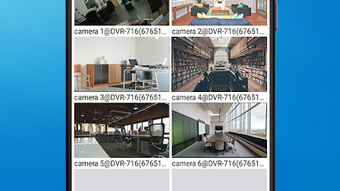
- Real-Time Surveillance: View live video feeds from up to 16 cameras simultaneously, enabling comprehensive monitoring of multiple zones.
- Remote Access: Connect to DVR systems and IP cameras over Wi-Fi or mobile data (3G/4G), allowing users to monitor their premises from anywhere.
- QR Code Integration: Simplify device pairing by using the built-in QR code reader to establish a secure connection quickly.
- Playback & Recording Management: Access and review recorded video footage, schedule automatic recordings, and manage storage efficiently.
- PTZ Control: Remotely control pan, tilt, zoom, focus, and other camera movements for dynamic surveillance adjustments.
- Media Capture: Take real-time photos or record short video clips directly from the live feed for documentation or evidence.
- Favorites & Device Information: Save frequently used cameras as favorites and view firmware and encoder version details for troubleshooting and compatibility checks.
- Digital Zoom: Enhance visual clarity of distant objects without losing image quality during live viewing.
These features collectively support efficient, flexible, and scalable surveillance operations. For example, a small business owner can monitor store entrances and backrooms in real time, while a homeowner can check on their property during travel. The ability to schedule recordings and capture moments on demand adds practical value for both personal and professional use cases. The app’s interface is designed to facilitate quick navigation between camera feeds and settings, reducing operational friction.
User Interface, Workflow & Performance
The user interface of Aquário Viewer is structured to prioritize clarity and accessibility, with a layout optimized for mobile touchscreens. Navigation is achieved through a central dashboard that displays connected cameras, allowing users to switch between feeds with minimal taps. The app employs a tab-based system for accessing playback, settings, and remote control functions, which supports a logical workflow.
Users can customize their experience by marking preferred cameras as favorites, streamlining access to critical monitoring points. The workflow from connection to live viewing is streamlined, especially with the QR code reader, which reduces manual configuration steps. However, the developer did not specify resource usage details, so exact performance behavior in terms of CPU or RAM consumption remains unknown.
General software behavior patterns suggest stable operation under normal network conditions. Stability during extended use and responsiveness across different Android devices have not been publicly documented. Performance observations are based on general software behavior patterns.
No user-reported issues or crash statistics were provided.
Compatibility & System Requirements
Aquário Viewer is designed for Android operating systems with a minimum requirement of Android 4.0. The app is compatible with a range of DVR models, including DVR-704, DVR-708, DVR-716, DVR-1004, DVR-1008, and DVR-1016, as well as Aquário IP Cameras. The app is available for free download on the Google Play Store, though the exact file size was not specified.
Installation size may vary depending on device configuration and cached data. The developer did not provide additional system requirements, such as processor speed, RAM, or storage space. Compatibility information was partially provided, with no mention of iOS or desktop platforms.
Users are expected to ensure their devices meet the minimum Android version and have a stable internet connection to maintain uninterrupted video streaming. The app requires access to the device’s camera, network, and storage for full functionality.
Pros and Cons
Pros
- Free to download and use with no in-app purchases
- Supports up to 16 camera feeds in real time
- Intuitive interface with QR code-based setup
- Remote control of PTZ functions and recording schedules
- Ability to capture photos and videos from live streams
- Compatibility with multiple DVR and IP camera models
- Offers firmware and encoder version visibility for diagnostics
Cons
- Only available for Android; no iOS or desktop version
- Exact system requirements and file size not disclosed
- No official information on long-term stability or performance under heavy load
- Relies entirely on network connectivity for functionality
- Limited to Aquário-branded hardware and compatible DVRs
FAQ Section
Is Aquário Viewer available for iOS devices?
Currently, the app is only available for Android. There is no official version for iOS devices.
Can I use Aquário Viewer without an internet connection?
No. The app requires a stable Wi-Fi or 3G/4G connection to stream live video and access remote devices.
What devices are compatible with Aquário Viewer?
The app supports various DVR models, including DVR-704, DVR-708, DVR-716, DVR-1004, DVR-1008, and DVR-1016, as well as Aquário IP Cameras.
Is the app secure when transmitting video data?
The developer did not provide specific details about encryption or security protocols used during data transmission.
How often does the app receive updates?
Update frequency is not publicly disclosed. Users are advised to check the Google Play Store for the latest version.
Final Thoughts + CTA
Aquário Viewer stands out as a capable, free solution for remote surveillance on Android devices. Its ability to support up to 16 live camera feeds, combined with robust PTZ controls and real-time capture, makes it a practical tool for both personal and small business use. The QR code integration simplifies setup, while the interface remains user-friendly and efficient.
Although the app is limited to Android and specific hardware, its functionality aligns well with users who rely on Aquário’s DVR and IP camera systems. The lack of detailed system requirements and performance data prevents a full assessment of long-term reliability, but the app’s core features are well-executed and purpose-built. For users already invested in the Aquário ecosystem, this app offers a seamless extension of their surveillance infrastructure.
If you need a secure, free, and functional remote monitoring tool for Android, Aquário Viewer delivers on its promise.
Download Aquário Viewer APK now





.png)

